Callbacks in JavaScript: Why They Exist ?
What are Functions in JavaScript
Think of a function as a reusable block of code that can perform a specific task and can be used multiple times by the user. We use them to avoid repeating code, making programs cleaner, easier to maintain, and is less error-prone. Without the function, we would have to write the code multiple times for the same work.
//Code without function
let result = 5 * 3
console.log(result)//15

let result2 = 10 * 4
console.log(result2)//40


/* **********************************************************/


//Code with function
function multiply(a, b) {
  return a * b
}

console.log(multiply(5, 3))//15
console.log(multiply(10, 4))//40
console.log(multiply(10, 6))//60
console.log(multiply(9, 4))//36
Function as values
In JavaScript, functions are like "First-Class Citizens." It is one way of saying a function is just another type of data, like a string or a number. It means
We can store them in a variable
We can also pass them to another function to be executed according to the user's requirements
We can also return them from functions
const buyChocolateForMe = function() {

console.log("Hello! Ram, Here is your Chocolate");

};

buyChocolateForMe(); // Hello! Ram, Here is your Chocolate
Passing a function as a value
function sayHelloToMe() {
  console.log("Hello Abhishek");
}

function executeMyFunction(fn) {
  fn(); // calling the function passed
}

execute(sayHelloToMe);
//Here we are not passing the result of syaHelloToMe but we are just  passing the function istself
What is a Callback Function?
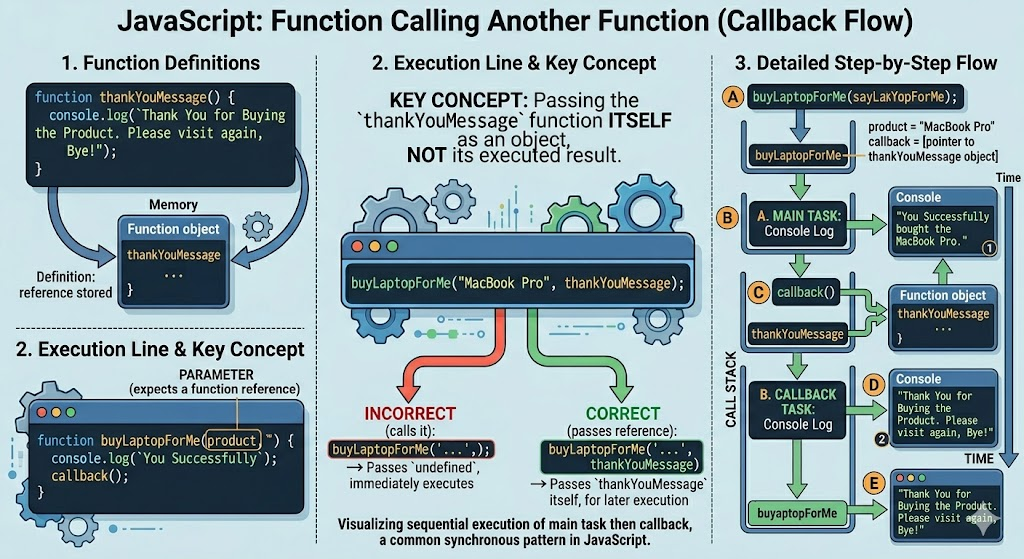
A function that is passed as an argument to another function and is executed later is known as a callback function.
function buyLaptopForMe(prodcut,callback){
    console.log(`You Successfully bought the ${prodcut}.`);
    callback();
}

function thankYouMessage(){

console.log("Thank You for Buying the Prodcut .Please visit     again , Bye!");

}

buyLaptopForMe("MacBook Pro", thankYouMessage);


//Here we excuting the callback function later after consoling the message
Output
You Successfully bought the MacBook Pro.
Thank You for Buying the Prodcut .Please visit again , Bye!
Why are callbacks used in asynchronous programming?
JavaScript is single-threaded , meaning it can only do one thing at a time. If a user gives it a task to read big file with 5000 or 10000 thousands lines of code or say download a 1 GB file or fetch some data from the database from the farway , the whole website would freeze until it's done.
To prevent the blocking or freezing , we use Asynchronous Programming.
We say to JavaScript:
Go start and read the file. I don't want to wait, so here is a callback function. Run it whenever you're finished
Example code without a callback function
console.log("Start reading file with some time");

setTimeout(function() {
 console.log("Inside timeout finised executing");
}, 2000);

console.log("End reading file ");
Output of the above code
Start reading file with some time
End reading file
Inside timeout finised executing
The setTimeout is executed later because it is async and it runs later
Using callback
function fetchMyFileData(callback) {

  setTimeout(function() {
    console.log("Data fetched successfully");
    callback();//precssMyData get excuted
  }, 2000);

}

function processMyData() {
  console.log("Processing data...");
}

fetchMyFileData(processMyData);

//Output:
//Data fetched successfully
//Processing data...
In the above the code, fetchMyFileData function is called and in it processMyData is passed as a callback function .After 2 second the console statement inside the setTImeout get executed and then the callback function is executed.
We see callbacks everywhere in modern JS development:
Timers: setTimeout(() => { ... }, 1000) runs code after a delay.
Events: button.addEventListener('click', () => { ... }) runs code only when a user clicks.
button.addEventListener("click", function() { console.log("Button clicked"); });
Data Fetching: Getting info from a database or an API.
function getUser(callback) {

setTimeout(() => {
callback({ name: "Ram" });
}, 1000); }

getUser(function(user) {
console.log(user.name);
});
Passing functions as arguments
function calculate(a, b, operation) {

return operation(a, b);

}
function add(x, y) {

return x + y;

 }

function multiply(x, y) {
 return x * y;

}
console.log(calculate(10, 5, add)); // 15
console.log(calculate(4, 5, multiply)); // 20
Problems with Callback
When multiple asynchronous operations depend on each other, callbacks get deeply nested, making the code hard to read and maintain.This is known as callback Hell
function step1(callback) {
    setTimeout(() => {
        console.log("Step 1 completed");
        callback();
    }, 1000);
}

function step2(callback) {
    setTimeout(() => {
        console.log("Step 2 completed");
        callback();
    }, 1000);
}

function step3(callback) {
    setTimeout(() => {
        console.log("Step 3 completed");
        callback();
    }, 1000);
}

step1(() => {
    step2(() => {
        step3(() => {
            console.log("All steps completed");
        });
    });
});
As the number of steps increases in our code , the nesting grows deeper and deeper, which makes the code difficult to manage ,read and debug.
To solve the issue of callback hell, we use
Promises
async/await
