JavaScript Arrays
What arrays are and why we need them?
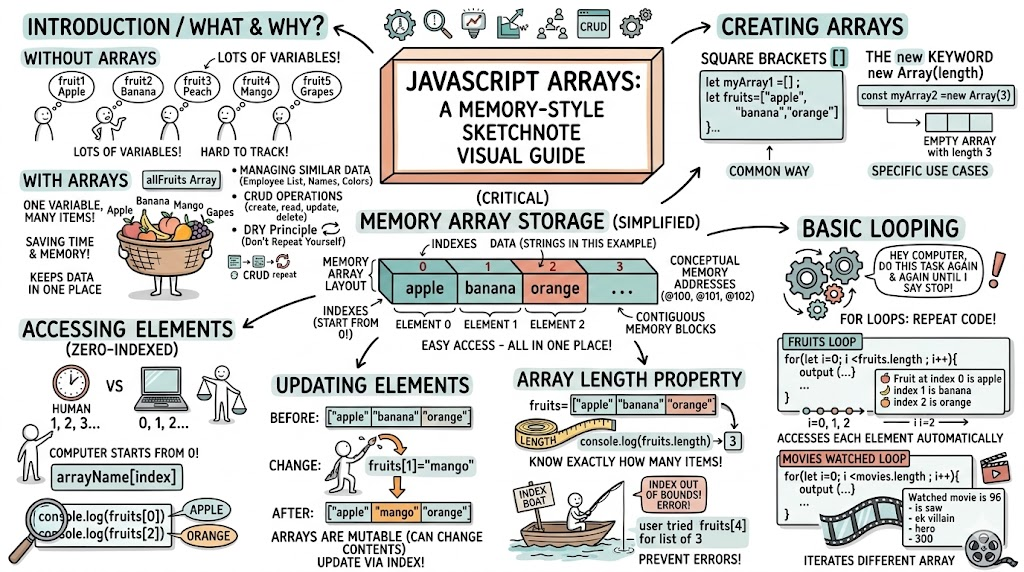
Arrays are a collection of items/elements that are stored under a single variable name.Think of array as basket of fruits , its just one basket holding different types of fruits or like library rack containing many books on it.If a basket was not there then it would be hard to keep all the fruits in one place,so a basket keep all the fruits in one place and a person can take any fruits from it whenever it wants and it access is easy because all fruits are kept in one place.
const fruit1='Apple';
const fruit2='Banana';
const fruit3='Peach';
const fruit4='Mango';
const fruit5='Grapes';

//For above fruits we can just make an array and keep all in one which will save time,memory and will be easy to acsess
const allFruits=["apple", "banana", "peach","mango","gapes"];/
//one varible holding all the fruits
Likewise array are like a basket containing a collection of items.If concept of arrays would not be present then we would have to make many variables to just store each data .
Arrays helps us in managing similar data (like list of employees, list of name,or list of different colors), it also helps us to follow the DRY(Don’t Repeat Yourself) principle and we can do CRUD( create , read , update , delete) operations on the data that is stored in the array.
How to create an Array?
In Javaccript we usually use square brackets to create an array or we can use the new keyword followed by Array(length) .
Synatx
let myArray1 =[] ;//empty array created with square bracket

const myArray2 =new Array(3) //empty array created with new Array with length 3


let fruits=["apple", "banana", "orange"] //fruits array created
Accessing Elements Using Index
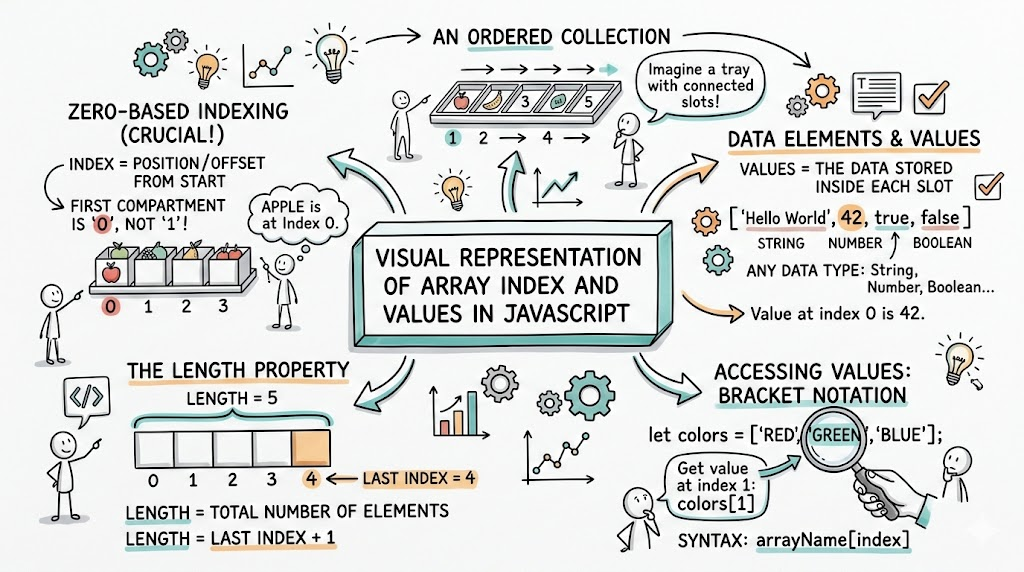
Arrays are zero-indexed ,this means that our computer start counting from 0 rather then 1.
The first item is at index 0 followed by second item at index 1.
Syntax: arrayName[index]
let fruits=["apple", "banana", "orange"] //fruits array created

console.log(fruits[0])//Accessing element with index 0
//Output will be ---> Apple
console.log(fruits[2])//Output will be ---> Orange
Updating Array Elements
Array are generally mutuable ,it means we can change the contents inside the array refrencing to the index.
let fruits=["apple", "banana", "orange"] //fruits array created

//updating banana with manago
fruits[1]="mango";

console.log(fruits) //  ["apple", "mango", "orange"]
Array Length Property
The length of an array property tells a user exactly how many items are inside the array. This is important because it helps user to avoid "Index Out of Bounds" errors ( a user trying to find the 4th item in a list of fruits).
let fruits=["apple", "banana", "orange"] //fruits array created
console.log(fruits.length) // 3
//if a user try to acess fruits[4]  then it give get an error index our of bounds becasue item 4 doesn't exist
Basic Looping Over Arrays
Looping is repeating code execution mutiple times automcatically until a certain condition is true. It's like saying to computer ' Hey do this task again and again until i say stop '.
let fruits=["apple", "banana", "orange"];

for(let i=0; i <fruits.length ; i++){

console.log( ` Fruit at index  \({i} is \){fruits[i]} `)

}
/*
 Fruit at index  0 is apple
 Fruit at index  1 is banana
 Fruit at index  2 is orange
*/


const movies=['96','saw','ek villain','hero','300'];
for(let i=0; i <movies.length ; i++){

console.log( `My watched movie is ${movies[i]} `)

}
/*
My watched movie is 96
My watched movie is saw
My watched movie is ek villain
My watched movie is hero
My watched movie is 300
*/
Summary :